Introduction
Generating every possible combination of two or more sets is a routine task in data science work — parameter grid searches, full factorial experimental designs, combination tables. That's precisely what a Cartesian product computes.
R offers several ways to do this, ranging from the base R workhorse expand.grid() to the tidyverse-native tidyr::crossing(), manual construction with rep(), and the C++-powered RcppAlgos::expandGrid() for large-scale work. Each method fits a different context, and picking the wrong one for your dataset size or workflow can cost you time or memory.
This guide covers all four methods with working code examples — syntax, output behavior, and the edge cases worth knowing before you hit them.
Key Takeaways:
expand.grid()is the standard base R tool — no packages requiredtidyr::crossing()is cleaner for tidyverse pipelines and never coerces strings to factorsrep()+data.frame()is a teaching approach, useful for understanding the mechanicsRcppAlgos::expandGrid()suits large-scale or performance-critical work- The right choice depends on dataset size, output type, and workflow context
What Is a Cartesian Product?
The Cartesian product A × B is the set of all ordered pairs (a, b) where a belongs to set A and b belongs to set B. Concretely: if A = {1, 2} and B = {"x", "y"}, then:
A × B = {(1,"x"), (1,"y"), (2,"x"), (2,"y")}
Four pairs, one for every combination of one element from each set.
Cardinality and Growth
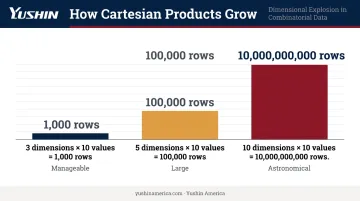
The number of rows in a Cartesian product equals the product of the input sizes: |A × B| = |A| × |B|. This extends naturally to more sets: |A × B × C| = |A| × |B| × |C|.
The scale compounds fast. Three hyperparameter dimensions with 10 values each yields 1,000 combinations. Five dimensions with 10 values each yields 100,000. The product cardinality rule is the direct reason why large grids can overwhelm memory.
One subtlety worth noting before moving on: order matters. A × B ≠ B × A unless A and B are identical sets.
Common R Use Cases
- Generating every combination of learning rate, tree depth, and regularization strength for hyperparameter grid search
- Building full factorial experimental designs across all treatment and factor levels
- Pairing product variants, factor codes, or category labels into lookup and combination tables for downstream analysis
Using expand.grid() in Base R
expand.grid() is R's built-in function for Cartesian products. Basic syntax:
expand.grid(x = c(1, 2, 3), y = c("a", "b"))
This returns a data frame with one column per named input and one row per unique combination — six rows total here.
Column Cycling Order
Per the official documentation, the first factors vary fastest in expand.grid(). So x cycles through 1, 2, 3 repeatedly while y changes more slowly. Example with three vectors:
expand.grid(x = 1:2, y = c("a", "b"), z = c("low", "high"))
#   x y    z
# 1 1 a  low
# 2 2 a  low
# 3 1 b  low
# 4 2 b  low
# 5 1 a high
# 6 2 a high
# 7 1 b high
# 8 2 b high
x cycles fastest, z changes slowest.
Iterating Over Results
Once you have the grid, iterate over rows to apply a function to each combination:
grid <- expand.grid(lr = c(0.01, 0.1), depth = c(3, 5))
results <- apply(grid, 1, function(params) {
  train_model(lr = params["lr"], depth = params["depth"])
})
Each row maps to one configuration, making it straightforward to loop hyperparameter sweeps or factorial experiments.
The stringsAsFactors Gotcha
expand.grid() has stringsAsFactors = TRUE in its current official signature. Character vectors become factors by default, which breaks downstream code expecting strings. Fix it explicitly:
expand.grid(x = c("a", "b"), y = c("x", "y"), stringsAsFactors = FALSE)
Note: R 4.0.0 changed the default for data.frame() and read.table(), but expand.grid() retains its own TRUE default — that global change does not apply here.
Scaling to Variable Inputs
When the number of input vectors is determined at runtime, use do.call():
params <- list(lr = c(0.01, 0.1), depth = c(3, 5, 7), reg = c(0.001, 0.01))
grid <- do.call(expand.grid, params)
This pattern handles any number of inputs without hardcoding the function call.
Using tidyr::crossing() and expand() for Cartesian Products
tidyr::crossing() is the tidyverse alternative to expand.grid(). It produces the same Cartesian product but with cleaner defaults for modern R workflows:
library(tidyr)
crossing(x = c(1, 2, 3), y = c("a", "b"))
Three key differences from expand.grid():
- Never converts strings to factors — strings stay strings
- Removes duplicate rows automatically — if your inputs contain repeated values,
crossing()deduplicates - Returns a tibble — works directly in dplyr/tidyr pipelines without conversion
expand() and nesting()
tidyr::expand() works with an existing data frame, generating all combinations of specified columns. The nesting() helper keeps some columns paired (co-varying) instead of fully crossing them:
df <- tibble(group = c("A", "A", "B"), value = c(1, 2, 3))

# Full cross: every group with every value
df %>% expand(group, value)

# Nesting: only observed group-value pairs
df %>% expand(nesting(group, value))
Use nesting() when two columns are always observed together and shouldn't be independently combined.
Piping into dplyr
crossing() output pipes directly into dplyr — no conversion needed:
crossing(lr = c(0.01, 0.1, 0.3), depth = c(3, 5)) %>%
  mutate(config_id = row_number())
This is the pattern recommended in Tidy Modeling with R for building regular hyperparameter grids.
When to prefer tidyr methods:
- Working inside a tidyverse pipeline
- String handling matters and factor coercion would cause bugs
- Deduplication of input combinations is needed out of the box
Manual Approach: Cartesian Products with rep()
For two vectors x and y, the manual construction looks like this:
x <- c(1, 2, 3)
y <- c("a", "b")

data.frame(
  x = rep(x, each = length(y)),
  y = rep(y, times = length(x))
)
rep(x, each = length(y))repeats each element ofxconsecutively — 1, 1, 2, 2, 3, 3rep(y, times = length(x))repeats the fullyvector — "a", "b", "a", "b", "a", "b"
Paired together, they produce all six combinations.
Extending this to three vectors requires nesting the logic further, and it gets quickly becomes impractical. The main value here is pedagogical — seeing exactly what expand.grid() and crossing() are doing under the hood.
That said, knowing the mechanics helps you recognize when standard functions don't behave as expected — and why.
Use the manual approach when:
- Teaching the mechanics of Cartesian product construction
- You need explicit control over repetition order that differs from standard behavior
- Working in an environment without tidyverse and without the need for a full function call
Once you move beyond two vectors or need results in a consistent, named format, expand.grid() or crossing() handles that more reliably with far less code.
Advanced Method: expandGrid() from RcppAlgos
The RcppAlgos package (version 2.10.1 on CRAN) implements combinatorics functions in C++, including expandGrid() for Cartesian products.
library(RcppAlgos)
expandGrid(1:3, c("a", "b"))               # returns matrix (same-type inputs)
expandGrid(1:3, c("a", "b"), return_df = TRUE)  # force data.frame output
Key Behavioral Differences vs. expand.grid()
| Behavior | expand.grid() |
expandGrid() |
|---|---|---|
| First column cycles | Fastest | Slowest |
| Output type (same-type inputs) | Data frame | Matrix |
| Output type (mixed inputs) | Data frame | Data frame |
| Strings to factors | Yes (by default) | Follows input types |
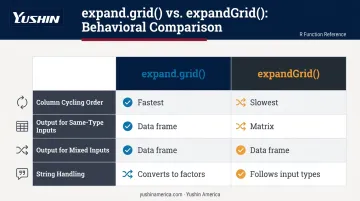
Run both on the same inputs and compare before switching — row ordering differences can break downstream code that relies on a specific sequence.
Memory-Efficient Alternatives
For very large grids, RcppAlgos offers two additional tools:
expandGridSample()randomly samples rows from a Cartesian product without generating the full setexpandGridIter()iterates through combinations one chunk at a time, keeping memory usage bounded
These matter when scale becomes unworkable: 10 parameter dimensions with 10 values each produces 10 billion rows, which no machine can hold in memory at once.
Choosing the Right Method and Real-World Applications
Decision Guide
| Scenario | Use |
|---|---|
| Standard base R work, no packages | expand.grid() |
| Tidyverse pipeline, string safety, deduplication | tidyr::crossing() |
| Teaching mechanics or needing explicit rep control | rep() + data.frame() |
| Large inputs, memory constraints, or speed-critical work | RcppAlgos::expandGrid() |
| Grid too large to hold in memory | expandGridSample() or expandGridIter() |
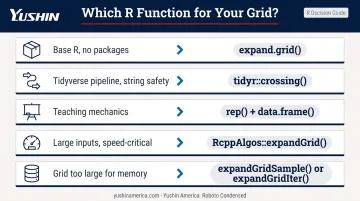
The table above covers the decision logic. The examples below show each pattern in a concrete context.
Hyperparameter Grid Search
Building a tuning grid for a machine learning model is a direct application. The caret package accepts tuneGrid as a data frame of parameter combinations — one row per model configuration:
library(tidyr)
tune_grid <- crossing(
  learning_rate = c(0.01, 0.05, 0.1),
  max_depth     = c(3, 5, 7),
  reg_lambda    = c(0.1, 1.0, 10.0)
)
# 27 rows — one per configuration
crossing() works well here: it deduplicates silently and feeds directly into your training loop without any cleanup step.
Pairwise Comparison Tables
Generating all ordered pairs from a single set — say, all product variant comparisons — uses expand.grid() with the same vector twice:
variants <- c("A", "B", "C", "D")
pairs <- expand.grid(v1 = variants, v2 = variants, stringsAsFactors = FALSE)
pairs <- pairs[pairs$v1 != pairs$v2, ]  # drop self-pairs
With 4 variants, expand.grid(variants, variants) produces 16 rows (4² = 16), dropping self-pairs leaves 12. For 10 variants, that's 90 pairs — manageable. For 100 variants, it's 9,900 rows. At that scale, consider RcppAlgos::expandGrid() or a sampling approach rather than materializing the full grid.
Frequently Asked Questions
What is a Cartesian product?
A Cartesian product of two sets A and B is the set of all ordered pairs (a, b) where a ∈ A and b ∈ B. In R, this produces a data frame where every row represents one unique combination of one element from each input set.
What is the Cartesian product of R and R?
R × R (where R denotes the real numbers) represents all points in a 2D plane — every ordered pair (x, y) of real numbers. This is the mathematical foundation for the Cartesian coordinate system.
What is %*% in R?
%*% is R's matrix multiplication operator, not a Cartesian product operator. It multiplies two conformable matrices (or vectors treated as matrices) and is entirely unrelated to expand.grid() or combination generation.
What is the difference between expand.grid() and tidyr::crossing()?
Both generate all combinations of input vectors. Key differences:
crossing()never converts strings to factors and drops duplicate rows automaticallycrossing()integrates cleanly into tidyverse pipelinesexpand.grid()requires no additional packages — it's available in base R
How do you compute the Cartesian product of more than two sets?
Both expand.grid() and crossing() accept more than two arguments: expand.grid(a, b, c). For a variable number of inputs determined at runtime, use do.call(expand.grid, list_of_vectors).
How large can a Cartesian product get in R?
The row count equals the product of all input sizes and grows exponentially: 10 sets of 10 elements each produces 10 billion rows. For inputs that large, use RcppAlgos::expandGridSample() to sample without full generation, or expandGridIter() for memory-efficient iteration.